If you're searching for how to build a clean sales pipeline in Notion, the real question isn't about database properties. It's about behavior: will your team actually update it?
Most Notion pipelines fail not because of bad design, but because nothing in the system forces honesty. Deals sit in "Qualified" for months. Next steps are empty. The forecast is fiction.
A clean pipeline is one where the structure itself drives updates — through the right fields, the right views, and a weekly cadence that takes 15 minutes.
Pipeline decay has three root causes:
1. Stages are feelings, not evidence.
If moving a deal from "Lead" to "Qualified" is based on gut feeling rather than criteria, people either promote deals too early (optimism bias) or leave them stuck (update avoidance).
2. There's no "next step" forcing function.
A deal without a next step is a dead deal nobody has admitted is dead. If the database doesn't surface this gap, it stays invisible until the quarterly review when everyone is surprised.
3. Reviews focus on talking, not views.
Most pipeline reviews are conversations: "Tell me about your deals." That's inefficient. A view that shows "deals with no next step" or "deals with next step date in the past" does the same job in 2 minutes — and doesn't depend on memory.
Every field must pass one test: does this change an action or a forecast?
Fields that pass:
Fields that usually don't pass:
The Weighted Value formula (Value × Probability ÷ 100) gives you a realistic forecast per deal without manual guessing.
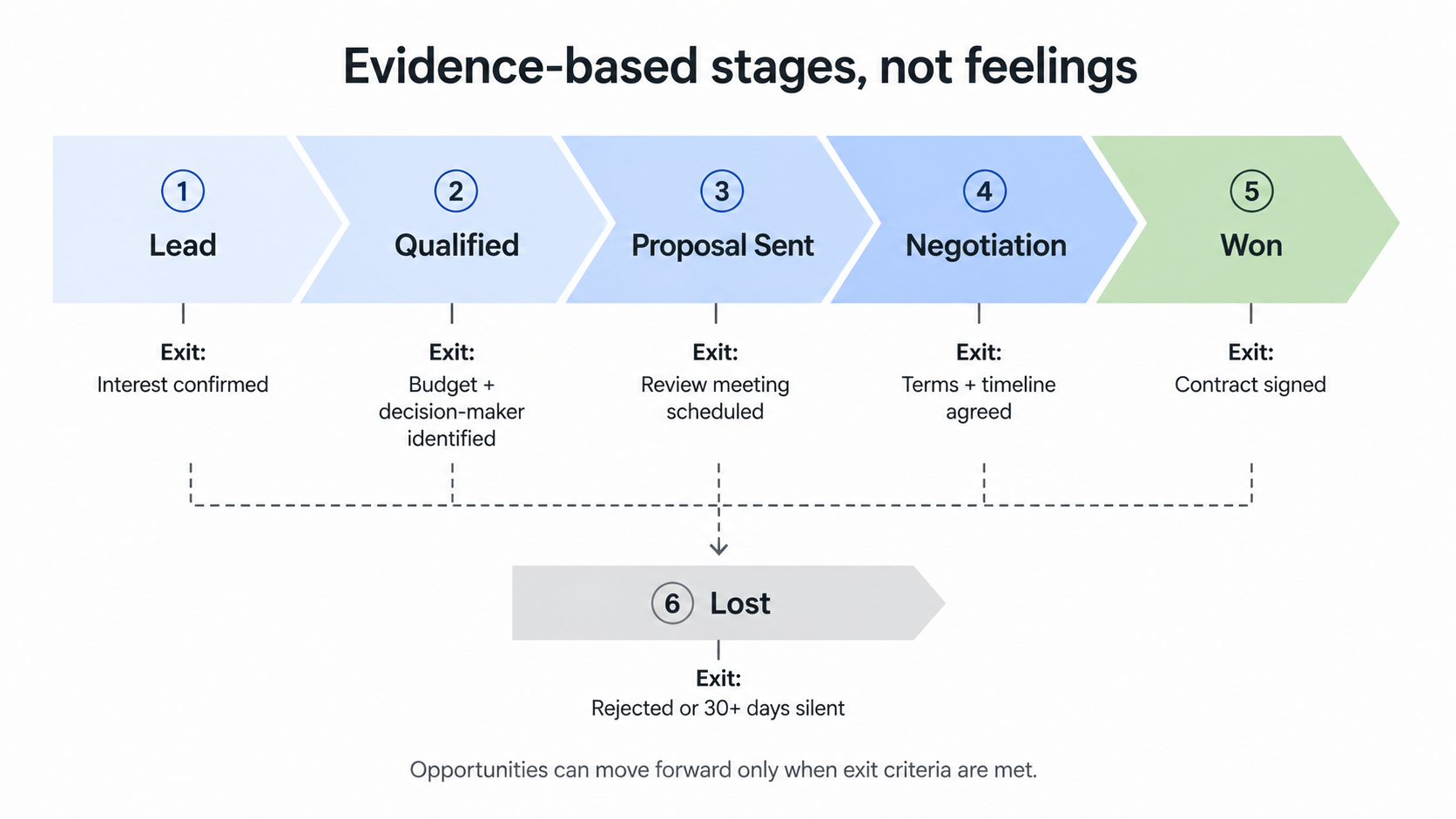
Use 5–7 stages. Each stage must have a clear exit criterion — a factual condition that must be met before the deal moves forward.
Pipeline health monitoring
The key word is evidence. "I think they're interested" keeps a deal in Lead. "They confirmed the budget is allocated and the CEO will review" moves it to Qualified.
Filter: Stage ≠ Won/Lost AND (Next step is empty OR Next step date < today)
This is the most powerful view in any pipeline. It surfaces neglected deals automatically. If this view is empty, your pipeline is healthy. If it's full, you know exactly what needs work.
Filter: Next step date within 7 days
Sort: Next step date ascending
This replaces the mental load of "who do I need to call?" It's the daily action list for sales.
Group by: Stage
Show: Value, Probability, Weighted Value
This is the view leadership cares about. Grouped by stage with summed weighted values, it gives a realistic revenue projection without spreadsheet gymnastics.
The review that keeps everything real:
This weekly rhythm is the difference between a pipeline that reflects reality and one that reflects hope.
Using Status instead of Stage. Status is a workflow concept (Draft, Active, Archived). Stage is a sales concept (where the buyer is in their decision process). Use Stage for pipeline management.
Mixing deals with orders. A deal is potential revenue. An order or subscription is committed revenue. The moment a deal is Won, it becomes an Order, Subscription, or Engagement — tracked in a separate database.
Too many custom fields. If your deal record has more than 10 properties, you're tracking data nobody uses. Strip it down to what changes weekly actions.
If you want a pipeline designed around real sales behavior — not admin theater — explore how UniFrame structures the full sales-to-revenue flow.


.jpg)
.jpg)